5} How do I get a fully qualified path name of my script?
At the command prompt enter "
FOR /?".
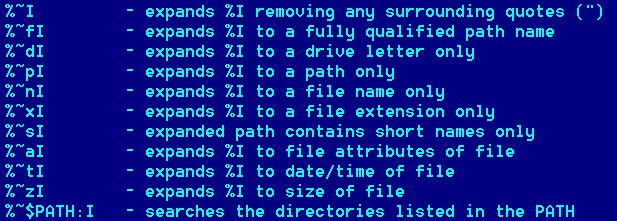
There look for the information on the substitution of FOR variable
references. In this particular case you would use the "
%~fI". Utilize the fact that the unexpanded
name of the script called will be in the parameter %0. Let's test it
@echo off
set fullnam_=%~f0
echo %fullnam_%
set fullnam_=
The output could be e.g.
C:\_D\TEST>cmdfaq
C:\_D\TEST\CMDFAQ.CMD
Note that the name might contain spaces after the expansion even
when the plain filename might not. So you may need to enclose
"fullnam_
" into
quotes, if you use it.
Let's also see what the other variable expansions provide. The full
name of our test file this time is
"C:\_D\TEST\Testing for the FAQ.CMD"
@echo off & setlocal enableextensions
echo %%~f0 %~f0
echo %%~d0 %~d0
echo %%~p0 %~p0
echo %%~n0 %~n0
echo %%~x0 %~x0
echo %%~s0 %~s0
echo %%~a0 %~a0
echo %%~t0 %~t0
echo %%~z0 %~z0
endlocal & goto :EOF
The output might be something like this:
C:\_D\TEST>"Testing for the FAQ.CMD"
%~f0 C:\_D\TEST\Testing for the FAQ.CMD
%~d0 C:
%~p0 \_D\TEST\
%~n0 Testing for the FAQ
%~x0 .CMD
%~s0 C:\_D\TEST\TESTIN~1.CMD
%~a0 --a------
%~t0 29.03.2008 08:09
%~z0 238
Another demonstration of the expansion is
@echo off
for %%f in (*.*) do echo %%~ff
It includes the full path into the "bare" default folder list.
The output might be something like this:
C:\MYSCRIPT\XTOOLS\CMDBOX.CMD
C:\MYSCRIPT\XTOOLS\FORFILES.EXE
C:\MYSCRIPT\XTOOLS\HOMMAG.CMD
C:\MYSCRIPT\XTOOLS\TEST.CMD
C:\MYSCRIPT\XTOOLS\XPNEW.CMD
C:\MYSCRIPT\XTOOLS\XPNEW1.CMD
C:\MYSCRIPT\XTOOLS\XPTD.CMD
C:\MYSCRIPT\XTOOLS\XPTDSUB.CMD
C:\MYSCRIPT\XTOOLS\XPTODAY.CMD
C:\MYSCRIPT\XTOOLS\XUNSUBST.CMD
If you use the following, the output will be exactly the same (again,
no quotes in the output)
@echo off
for %%f in ("*.*") do echo %%~ff
Likewise, no quotes in the output when using
@echo off
for %%f in (
"*.*
") do echo %%
f
The output might be something like this:
CMDBOX.CMD
FORFILES.EXE
HOMMAG.CMD
TEST.CMD
XPNEW.CMD
XPNEW1.CMD
XPTD.CMD
XPTDSUB.CMD
XPTODAY.CMD
However, with
@echo off
for %%f in (
"XPNEW.CMD
") do echo %%f
The output will be (irrespective of the existence or not of such a file):
"XPNEW.CMD"
another for loop expansion demonstration,
which shows a subtle difference in the behavior of explicit-path
versus wild-carded references. Observe the difference in the need of
the quote characters in order to arrive at comparable outcomes.
@echo off & setlocal enableextensions
echo.
echo for %%%%f in ("C:\_D\TEST\My test file.txt") do echo %%%%f
for %%f in ("C:\_D\TEST\My test file.txt") do echo %%f
echo.
echo for %%%%f in ("C:\_D\TEST\*.txt") do echo "%%%%f"
for %%f in ("C:\_D\TEST\
*.txt") do echo
"%%f
"
endlocal & goto :EOF
The output could be e.g.
C:\_D\TEST>cmdfaq
for %%f in ("C:\_D\TEST\My test file.txt") do echo %%f
"My test file.txt"
for %%f in ("C:\_D\TEST\*.txt") do echo "%%f"
"C:\_D\TEST\My test file.txt"
"C:\_D\TEST\My test file2.txt"
Still a demonstration of the subtleties of explicit file names and file
names with wildcards.
@echo off & setlocal enableextensions
set tempdir_=C:\_M
for %%f in (F-PROT.INI
PS.DAT
PS.SBK
RANDSEED.BIN
"My Scans.lnk
"
Thumbs.db
) do if exist "%tempdir_%\%%
~f" echo del /p "%tempdir_%\%%
~f"
for %%f in (
"%tempdir_%\Copy of *.JPG
") do if exist "
%%f" echo del /p "
%%f"
endlocal & goto :EOF
The output could be e.g.
C:\_M>c:\_d\bas\cmdfaq
del /p "C:\_M\PS.SBK"
del /p "C:\_M\My Scans.lnk"
del /p "C:\_M\Copy of 69010605.JPG"
Another demonstration. What will the following code output?
@echo off & setlocal enableextensions
for %%a in ("Hello World") do echo %%a
echo.
for %%a in ("Hello World") do echo %%
~a
echo.
for %%a in ("
*") do echo %%a
endlocal & goto :EOF
C:\_D\TEST>CMDFAQ
"Hello World"
Hello World
My test file.txt
My test file2.txt
Why? Because the wildcard matches all the files in the folder.

 Assorted NT/2000/XP/.. CMD.EXE Script Tricks